
Overview
A License Key is an activation code required to use all features of FarmSync.You need to redeem (activate) the License Key to access all premium functions.
You can purchase a License Key from the official FarmSync website or from authorized resellers.
Steps to Redeem License Key
1
Access the link below
2
Enter the code in the Redeem a License field
- Find the field labeled “Redeem a License”
- Enter the License Key in the empty field with the format:
XXXX-XXXX-XXXX-XXXX
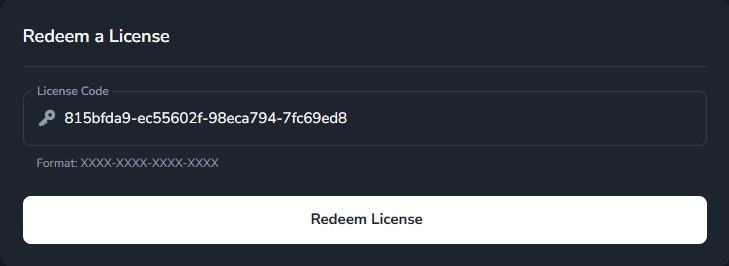
Make sure to enter the correct format:
(4 groups of characters, 4 characters each, separated by hyphens)
XXXX-XXXX-XXXX-XXXX(4 groups of characters, 4 characters each, separated by hyphens)
3
Confirm activation
- After entering the License Key, click the “Redeem License” button
- Wait for the system to validate the License Key
- If successful, you will see a confirmation message
4
Verify the activated License
- Find the License Key you just entered in the table
- Check the “Active” status and License information
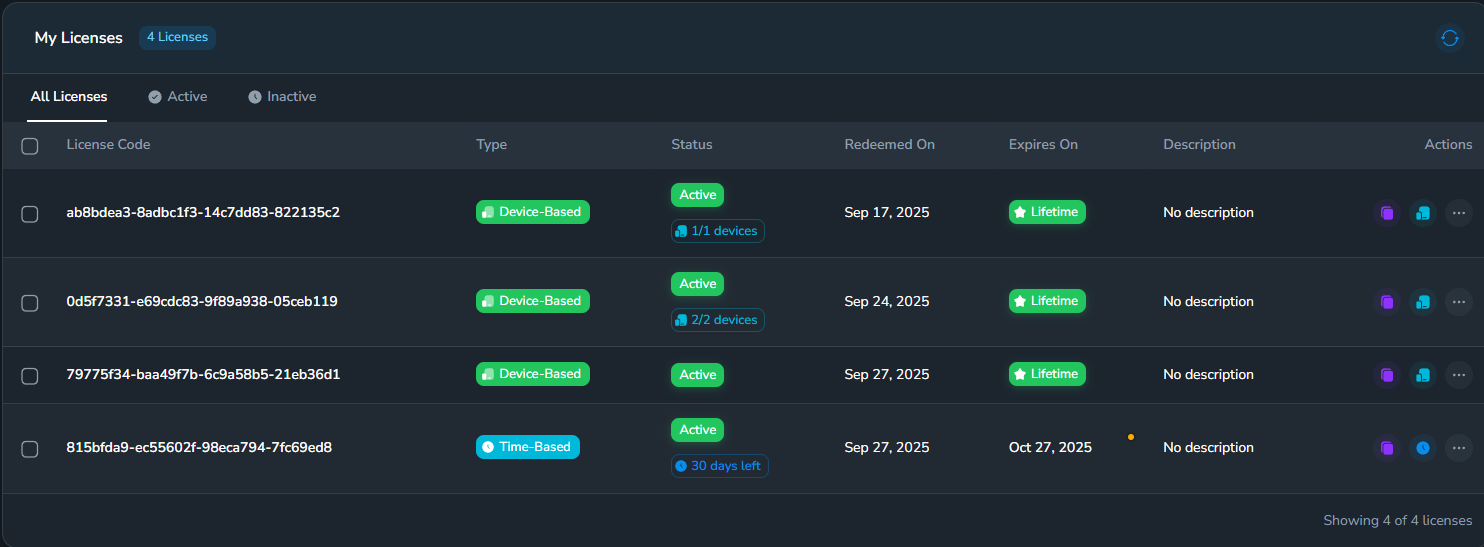
To ensure you’ve successfully redeemed the License Key, check if the License Key you entered appears in the “My Licenses” table.
If it’s there and the status is “Active”, you’ve succeeded!
If it’s there and the status is “Active”, you’ve succeeded!
Troubleshooting
Error: Invalid License Key
Error: Invalid License Key
Possible causes:
- License Key has already been used on another device
- License Key has expired
- Incorrect License Key entry
- Double-check the License Key
- Contact support if the License Key hasn’t been used
- Purchase a new License Key if it has expired
Error: Cannot connect to server
Error: Cannot connect to server
Causes:
- Unstable internet connection
- FarmSync server is under maintenance
- Check your internet connection
- Try again in a few minutes
- Contact support if the problem persists
Error: License already in use
Error: License already in use
Causes:
- License Key has already been activated on another device
- You’ve already activated it before and forgot
- Check other devices that have been activated
- Purchase a new License Key if needed
Additional Information
License Types
Time-Based License
A flexible license that provides a pool of days that you can allocate to any number of devices.You decide how to distribute the days across all your devices. Example:
A 30-day license can be split into 10 days for 3 different devices,
or all 30 days can be applied to a single device.
Device-Based License
This is a lifetime license that allows access for a specific number of devices.Instead of counting days, this license counts the number of devices that can use it. Commonly used for permanent device slots or lifetime subscriptions. Special note:
Device-based licenses with the “Lifetime” feature have a virtually unlimited expiration (99999 days),
but are limited to the specific number of devices that can use them.
Support
If you encounter any issues while redeeming your License Key, please:Contact Support
Email the technical support team
FAQ Documentation
View frequently asked questions